 Showbiz
 Saturation
Showbiz Budgeting Alternative: Cloud Budgeting Built for Modern Productions
Showbiz Budgeting 10 costs $399 for 2 installs with no free tier. Saturation is free to start and cloud-native. Compare features, pricing, and workflows for film and commercial production.
Feature Comparison
Showbiz vs Saturation
Feature | Showbiz | Saturation |
|---|---|---|
Currencies | ✅ | ✅ |
Globals | ✅ | ✅ |
Fringes | ✅ | ✅ |
Actualization | ✅ | ✅ |
Phases | ✅ | ✅ |
Cost Reports | ✅ | ✅ |
Real-time Collaboration | ❌ | ✅ |
Integrations | ❌ | ✅ |
Overtime Calculation | ✅ | ✅ |
Automation | ❌ | ✅ |
Access Controls | ❌ | ✅ |
Commenting | ❌ | ✅ |
Templates | ✅ | ✅ |
Contact Management | ❌ | ✅ |
Markups | ✅ | ✅ |
Free Plan Available | ❌ | ✅ |
Price | $49/mo | $25/mo |
Showbiz Budgeting Alternative: Cloud Budgeting Built for Modern Productions
By Jens Jacob, Film Producer and Founder, Saturation.io | Credits: After Death, The Heart of Man | Updated February 2026
Showbiz Budgeting 10 is a well-established desktop application used across commercial, television, and independent film production. Built by Media Services, which is now part of Cast and Crew, it has been in the market for decades and is genuinely capable software for production accountants who use it regularly.
If you are evaluating whether to stay with Showbiz or move to a cloud-native platform, this comparison covers the real differences: where Showbiz excels, where it falls short, and what Saturation offers as an alternative. The right choice depends on your production type, team structure, and workflow requirements.
What Is Showbiz Budgeting?
Showbiz Budgeting 10 is a desktop film budgeting application developed by Media Services, a company owned by Cast and Crew. It runs on both Mac (macOS 12 and above) and Windows (Windows 7 and above). The base license covers 2 computer installations and is priced at $399. Existing users upgrading from version 8 pay $99 per installation.
The software is designed primarily for production accountants, production managers, and producers who work in commercial, music video, and scripted content. Showbiz has a reputation as "a nice middle ground between Movie Magic Budgeting and Hot Budget" in the commercial production space: more feature-rich than Hot Budget, and more accessible than Movie Magic Budgeting for independent and commercial work.
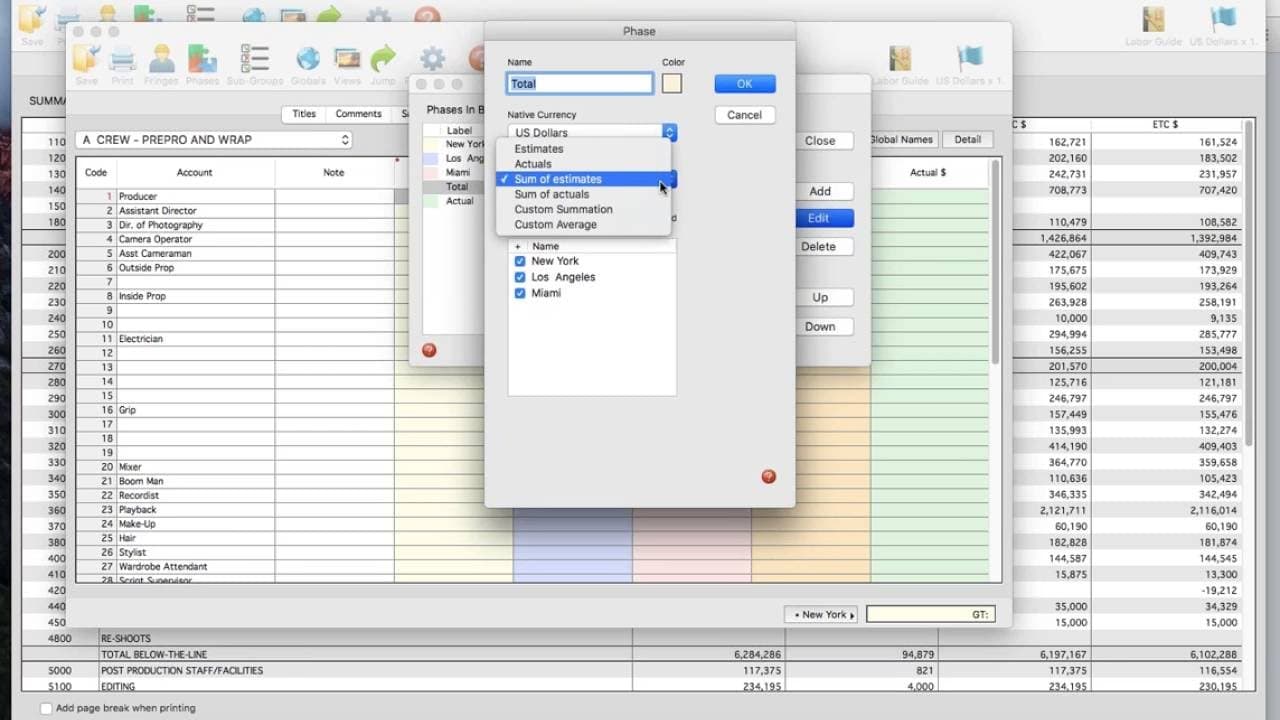
Key capabilities include over 100 customizable templates covering AICP commercial formats, episodic TV, studio formats, and independent features. The software includes an integrated overtime calculator, a purchase order management system, and an optional cloud collaboration add-on. A direct integration with Cast and Crew payroll enables timecard-driven actualization during production.
Showbiz Budgeting's Core Strengths
- 100+ budget templates: Pre-built templates spanning AICP commercial production, episodic TV, features, and studio formats cover nearly every production type
- Overtime calculator with five tiers: Handles complex union overtime rules automatically, with editable pay multiples per tier
- Integrated purchase order system: Tracks committed costs separately from actuals without requiring a separate tool
- Budget phases: Segment budgets across locations or production phases to qualify for incentive programs
- Dynamic currency links: Editable exchange rates for international co-productions, with automatic budget updates across line items
- Cast and Crew payroll integration: Direct import of timecard data for production actuals, reducing manual entry for productions using Cast and Crew
- Cloud collaboration add-on: Optional monthly or annual subscription that enables real-time budget sharing with granular permission controls
- Cross-platform compatibility: Runs on both Mac and Windows, unlike Hot Budget which is Mac-only
- Free companion tools: Showbiz PC Envelope (petty cash tracking), Showbiz PO Log (purchase orders), and Showbiz Labor Guide are available at no cost
Showbiz Budgeting's Limitations
- High entry cost: $399 for 2 installations, with proportional increases for additional machines ($548 for 3, up to $2,528 for 20)
- Desktop-first design: The core application runs locally. Cloud collaboration is an optional add-on, not the default architecture
- Steep learning curve: Built for production accountants; producers and line producers who budget occasionally report a significant ramp-up period
- No free tier or trial: No publicly listed free tier and no free trial advertised on the website
- No integrated expense cards: Expense tracking against actuals requires either the Cast and Crew payroll integration or manual reconciliation
- Per-machine licensing model: Adding team members requires additional installation licenses, increasing total cost for larger teams
- Interface complexity: The interface is functional but dense. Multiple users describe it as requiring dedicated training to use efficiently
Showbiz Budgeting 10 includes over 100 customizable templates spanning AICP commercial formats, major studio formats, episodic TV, and independent features. For commercial production houses or episodic TV teams that have built years of templates in Showbiz format, this library is a meaningful asset. The software's layout, while described by users as having a "weird" interface, is highly flexible once you know it.
Saturation includes templates for the most common production types: feature films, TV series, commercials, music videos, short films, and documentaries. The template library is smaller but covers what most independent and mid-budget productions need. For AICP commercial work, Saturation's AICP account code template provides the required structure. The interface is designed to be accessible without production accounting training.
Union Fringe Calculations
Showbiz Budgeting includes an integrated overtime calculator that handles union overtime rules across five tiers with editable pay multiples. Fringe rates for union affiliations are entered manually, but the overtime math is automated and updates dynamically as you build the budget.
Saturation calculates union fringes automatically for SAG-AFTRA, IATSE, DGA, and WGA as you build the budget. Select the union affiliation for each crew category and the correct rates apply across the entire budget. For productions where fringe represents 30 to 45 percent of total crew costs, automated fringe calculation significantly reduces both prep time and the risk of calculation errors that compound across hundreds of line items.
Cloud Collaboration Architecture
Showbiz Budgeting is desktop-first. The software runs locally on Mac or Windows, and cloud collaboration requires an additional monthly or annual subscription on top of the $399 base license. The cloud add-on enables real-time budget sharing with granular permission controls, which is useful for distributed teams, but it is not the default way Showbiz works.
Saturation is cloud-native. The browser-based platform requires no installation, and real-time collaboration is built into every plan at no additional cost. Multiple users can edit the same budget simultaneously from any device or location. For remote production teams where the line producer, production coordinator, and department heads are in different cities, this is the most practically significant difference between the two tools.
Actuals and Expense Integration
Showbiz Budgeting's actualization feature allows production cost tracking during the shoot. For productions using Cast and Crew payroll, timecard data imports directly into the Showbiz budget and updates actuals automatically. This is a genuine workflow advantage for productions in the Cast and Crew ecosystem.
Saturation tracks actuals through Saturation Pay expense cards. When department heads spend on a Saturation Pay card, the transaction posts automatically to the correct budget line item in real time. No manual reconciliation, no end-of-week catch-up. For productions that are not using Cast and Crew payroll, Saturation's card-integrated actuals tracking is more seamless than manual entry or external import.
A note on Saturation Pay: Saturation Pay handles contractor and vendor payments only. It is not a W-2 payroll service. For payroll processing, productions continue to use their existing payroll provider (Cast and Crew, EP, or another processor).
Purchase Order Tracking
Showbiz Budgeting includes an integrated PO system that tracks committed costs separately from actuals. Vendor transactions are customizable, and the PO log generates automatically from within the budget. For productions with complex vendor relationships, this is a meaningful built-in capability that eliminates the need for a separate PO tracking document.
Saturation does not include a dedicated PO module. Productions that require formal purchase order tracking alongside their budget will need to manage POs in a separate document or system when using Saturation. This is a genuine capability gap worth weighing for productions with large vendor counts.
Pricing Depth
Showbiz Budgeting pricing scales by number of installations. Two installs cost $399. Three installs cost $548. A 20-install license runs $2,528. Cloud collaboration is an additional subscription on top of the base cost. For a production company where five team members need access, the licensing cost alone exceeds $700 before adding cloud features.
Saturation's pricing is simpler. The free tier covers one active project with full budgeting functionality. The $25/month plan covers unlimited projects. The $65/month Workspace plan covers an unlimited number of collaborators with no per-seat cost. Cloud collaboration is included in every plan by default.
Pricing Comparison
Scenario | Showbiz Budgeting 10 | Saturation.io |
|---|---|---|
Single producer, 1 project | $399 (one-time, 2 installs) | Free |
Single producer, multiple projects | $399 (one-time) | $25/month |
Team of 3, cloud collaboration | $548 (licenses) + cloud add-on subscription | $65/month (full team, cloud included) |
Team of 5, cloud collaboration | $995+ (licenses) + cloud add-on subscription | $65/month |
Year 2 renewal cost | Low (perpetual license, no forced renewal) | $300/year ($25/month) or $780/year ($65/month) |
Free trial | None publicly listed | Free tier, no credit card required |
One nuance worth noting: Showbiz Budgeting uses perpetual licensing. After the initial purchase, there is no forced annual renewal (though upgrades to new versions cost extra). Saturation is a subscription model. For a solo production accountant who bills multiple productions per year, Showbiz's perpetual license may be lower total cost in year two and beyond. For teams with more than two or three users who need collaboration, Saturation's pricing is consistently lower.
Who Should Use Showbiz Budgeting?
Showbiz Budgeting makes the strongest case in these specific situations:
- Productions in the Cast and Crew payroll ecosystem: The direct payroll integration for timecard-driven actualization is the most compelling reason to stay with Showbiz. If your production uses Cast and Crew for payroll, the seamless actuals import is a genuine workflow advantage
- High-volume commercial shops with existing Showbiz templates: Commercial production companies that have built years of proprietary templates in Showbiz format face meaningful switching costs. If your entire AICP bid library lives in Showbiz, rebuilding those templates is real work
- Productions requiring a dedicated PO system: Showbiz's integrated purchase order module handles committed costs separately from actuals without requiring a separate tool. For productions with dozens of active vendors, this built-in capability matters
- International co-productions: Dynamic currency links with automatic budget updates across line items are genuinely useful for productions running in multiple currencies simultaneously
- Production accountants who already know Showbiz well: Familiarity matters in production. An accountant who has used Showbiz for years will build budgets faster in Showbiz than in any new tool, even a better-designed one
- Large studio or multi-phase productions: The budget phases feature for segmenting productions across locations or incentive qualification periods suits complex, multi-territory productions
Who Should Use Saturation?
- Independent films, music videos, and commercials not on Cast and Crew payroll: Without the payroll integration, Showbiz's actualization advantage disappears. Saturation's card-integrated actuals tracking becomes more useful
- Productions starting fresh with no legacy tools: The free tier and low monthly cost make Saturation the rational starting point for new production companies or producers who have not yet committed to a budgeting platform
- Teams that need cloud collaboration without paying extra: Cloud-native architecture means collaboration is the default, not an add-on. Remote teams benefit immediately without additional configuration or subscription cost
- Producers and line producers managing their own budgets: Saturation's lower learning curve makes it accessible to people who are not full-time production accountants. You can build a working budget from a template without dedicated training
- Productions that want expense cards integrated with the budget: Saturation Pay cards eliminate the manual reconciliation step by posting transactions directly to the correct budget line item in real time
- Productions that want to pay contractors and vendors from the same platform: Saturation Pay handles direct payments to vendors and contractors, keeping contractor payments and budget tracking in one place
- Cost-conscious productions or frequent freelance budgeters: The free tier for one project and $25/month for unlimited projects is dramatically lower than Showbiz's $399 entry license
Can You Use Showbiz Budgeting and Saturation Together?
For some production companies, using both tools is a practical option during a transition period. Showbiz handles the budget prep and AICP bid for commercial productions, while Saturation manages the expense tracking and actuals during the shoot via Saturation Pay cards. There is no direct data bridge between the two platforms, so line items would need to be maintained in both systems during a parallel-run period.
For most production teams, running two budgeting platforms long-term creates more friction than value. The more practical approach is to evaluate which platform covers your core workflow and migrate fully rather than maintaining both indefinitely.
How to Move from Showbiz Budgeting to Saturation
There is no direct import from Showbiz Budgeting format into Saturation. The migration path for most productions:
- Start a free Saturation account and select the template closest to your production type. For commercial work, use the AICP template. For features, use the feature film template
- Export your current Showbiz budget to PDF or Excel and use it as a reference while building your standard line items in Saturation
- Build your core template once. Most producers complete a full line-item rebuild in two to four hours. Once the template exists in Saturation, it is reusable across all future projects at no additional cost
- Run one production on Saturation while keeping Showbiz as a reference. Use Saturation Pay cards for department spending on that production to experience the integrated actuals workflow before committing to a full switch
- Migrate fully after confirming the output meets your standards. The free tier means there is no cost during the evaluation period
Showbiz Budgeting Alternatives: The Broader Landscape
If you are evaluating options beyond Showbiz and Saturation, here is an overview of the main alternatives:
- Saturation.io: Cloud-native, free to start, integrated expense cards and contractor payments. Best for teams that want collaboration without add-on costs and real-time actuals tracking without Cast and Crew payroll
- Movie Magic Budgeting: Approximately $42.99/month per seat, desktop application for Mac and Windows, dominant in studio features and high-budget TV. Also in the Cast and Crew ecosystem. More scripted-content focused than commercial
- Hot Budget: $100/year per Mac installation, AICP-native, commercial production standard. Mac-only, single-user, no cloud collaboration. The lowest-cost dedicated commercial budgeting tool available
- Gorilla Budgeting: Cloud-based, independent film focus, lower cost than Showbiz. A simpler feature set than Showbiz but a more accessible interface for independent productions
- Celtx: Cloud-based all-in-one pre-production platform that includes budgeting alongside screenwriting and scheduling. Better for productions that want integrated pre-production tools rather than a dedicated budgeting application
For a full comparison across all major film budgeting tools, see the complete film production accounting software guide.
Frequently Asked Questions
How much does Showbiz Budgeting 10 cost?
Showbiz Budgeting 10 costs $399 for a 2-installation license. Additional installations scale proportionally: 3 installs are $548, and a 20-install license costs $2,528. Existing users upgrading from version 8 pay $99 per installation. Cloud collaboration is an optional add-on with a separate monthly or annual subscription. There is no free tier and no publicly listed free trial.
Is there a free alternative to Showbiz Budgeting?
Yes. Saturation.io offers a permanently free tier that includes full film budgeting: ATL/BTL structure, automatic fringe calculations, a template library, and PDF/Excel export. The free plan does not expire and is not a trial. For productions that need more than one active project or team workspace features, paid plans start at $25/month.
Is Showbiz Budgeting cloud-based?
Showbiz Budgeting 10 is primarily a desktop application for Mac and Windows. A cloud collaboration add-on is available as a separate subscription, but the core software runs locally. Saturation is fully cloud-native: it runs in a browser with no local installation required, and collaboration is included in all plans by default at no additional cost.
Who makes Showbiz Budgeting?
Showbiz Budgeting is developed by Media Services, which is owned by Cast and Crew. The software was previously distributed under the Media Services brand. Product pages are now hosted on the Cast and Crew store. The software remains branded as Showbiz Budgeting 10.
Can Saturation replace Showbiz Budgeting for commercial production?
For most commercial and music video productions that are not using Cast and Crew payroll, yes. Saturation supports AICP account code structure, ATL/BTL budget format, automatic fringe calculations, and real-time actuals via Saturation Pay expense cards. The primary advantages Showbiz holds over Saturation are its dedicated PO module, the Cast and Crew payroll direct integration, its larger template library, and its dynamic currency tools for international co-productions. For productions where those specific features are critical, Showbiz is the stronger choice.
What is Saturation Pay, and is it payroll?
Saturation Pay is not a payroll service. It handles contractor and vendor payments only. Productions still use their existing payroll processor (Cast and Crew, EP, or another provider) for W-2 crew. Saturation Pay provides virtual and physical expense cards for department heads, handles direct payments to vendors and contractors, and posts transactions automatically to the correct budget line items in real time.
Does Saturation have AICP templates for commercial production?
Yes. Saturation includes an AICP account code template that covers the standard commercial production format. For commercial producers evaluating Saturation as a Showbiz alternative, the AICP template is the starting point for building bids in the correct structure. Showbiz has a larger template library overall, but the AICP format is available in Saturation.
Ready to try a cloud-native alternative? Start free at Saturation.io. No credit card required, no installation needed.
Ready to Switch? Start Free with Saturation
Saturation is a modern, cloud-based alternative to Showbiz Budgeting, with collaborative budgeting, real-time expense tracking, and production banking built in. No credit card required. Start your free Saturation account.
Banking, cards, and payments, built into Saturation
Spend from production banking, issue cards to the crew, and approve every dollar in one place.
Banking
Saturation Pay: accounts, cards and bill pay in one place. Send ACH, wire or same-day.
Issue Cards
Virtual cards spend instantly, physical ships in a week. One at a time or twenty-five at once.


Payments
Every payment, in one place.
Credit
A charge card that codes itself, earns up to 3% cash back, and unlocks discounts on production tools.
Flows
Branch it, delay it, dry-run it.
Receipt scanning
Receipts arrive already coded.