 Hot Budget
 Saturation
Hot Budget Alternative: Modern Cloud Film Budgeting
Hot Budget costs about $100 a year per Mac and has no cloud version. Saturation is free to start, runs in any browser, and adds collaboration on paid plans.
Feature Comparison
Hot Budget vs Saturation
Feature | Hot Budget | Saturation |
|---|---|---|
Commercial Budgeting | ✅ | ✅ |
Cloud-based / Browser Access | ❌ | ✅ |
Real-time Collaboration | ❌ | ✅ |
Mobile Access | ❌ | Browser, plus iOS Wallet app (cards, receipts) |
Fringe Calculations | ✅ | ✅ |
AICP Format Support | ✅ | ✅ |
Expense Tracking / Actuals | ❌ | ✅ |
Production Banking + Cards | ❌ | ✅ |
Free Plan | ❌ | ✅ |
Price | $100/yr per device | Free; paid from $32/mo (billed annually) |
Hot Budget Alternative: Cloud-Based Film Budgeting for Modern Productions
By Jens Jacob, Film Producer and Co-founder, Saturation.io | Producer of After Death and The Heart of Man | Updated February 2026
If you have spent time in commercial production, you know Hot Budget. It is the default budgeting tool for AICP bids, built around the account code structure that ad agencies expect to receive. For Mac-based commercial production companies, it has been the standard for years.
But the production landscape has changed. Productions now include distributed teams across multiple time zones, department heads who work on Windows or need mobile access, and line producers who want actuals flowing automatically from expense cards rather than being entered by hand. Hot Budget was not built for any of that.
This page gives you an honest comparison of Hot Budget and Saturation.io so you can decide whether to switch, stay, or use both.
What Is Hot Budget?
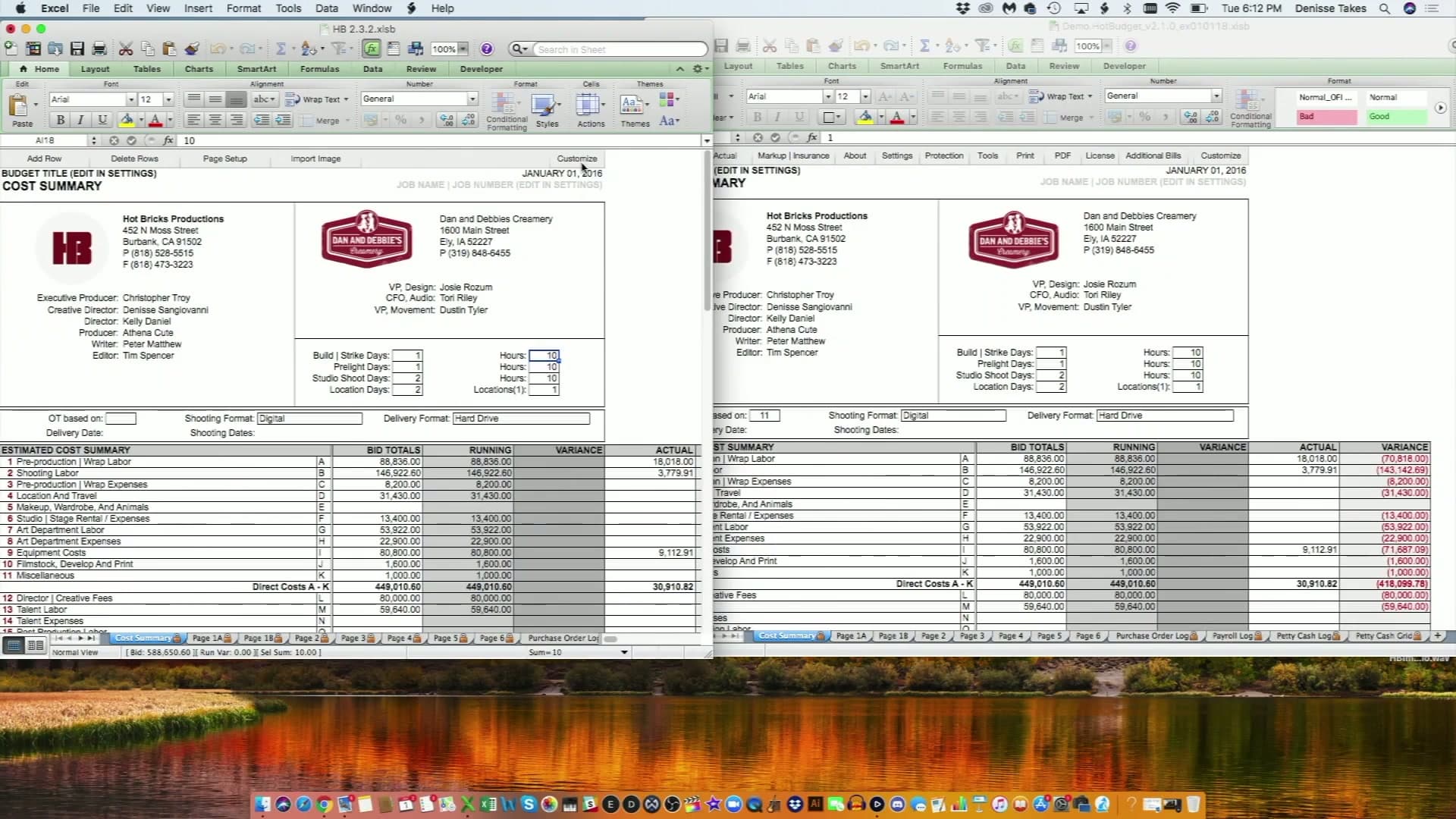
Hot Budget is a Mac-native film budgeting application built on top of Microsoft Excel. It runs as a macro-enabled workbook (.xlsm) using VBA macros and JavaScript on macOS. There is no browser version, no dedicated Windows version, and no cloud sync. The entire budget lives on the local machine where Hot Budget is installed.
Hot Budget is developed by Hot Bricks, LLC, a Burbank production supply and communications rental company, and became the standard tool in commercial production and music video work. Its defining feature is AICP compliance: the software boots directly into AICP account code structure, which generates the topsheet format that ad agencies and brands require with a commercial bid.
Version 3 was released in 2023 and resolved the stability issues that affected earlier versions. The annual license is approximately $100 per Mac installation. The license expires on January 1 of the following year. There is no free tier and no trial period.
What Hot Budget Does Well
- AICP format built in: Boots directly into AICP account code structure. Commercial producers submitting bids to ad agencies do not need to build this from scratch.
- Spreadsheet familiarity: Built on Excel, so producers and accountants comfortable with spreadsheets adapt quickly with minimal learning curve.
- Side-by-side budget views: Shows Original Budget, Running Budget, and Actual Budget in a single view, useful for tracking budget vs. actuals in production.
- Import functionality: Purchase orders, petty cash logs, and payroll data can be imported from one Hot Budget file to another.
- Timecard import: Hot Budget imports timecard batch CSV files for actuals tracking.
- Low annual cost: At approximately $100 per year per Mac, it is among the more affordable dedicated budgeting tools.
Hot Budget Limitations in 2026
- No supported Windows version: Hot Bricks does not release Windows updates, and on some Windows 10 versions of Excel it works only with limited functionality.
- Desktop-only: No cloud version. Budgets exist as files on a local hard drive.
- Single-user architecture: One person works in a budget at a time. No simultaneous multi-user editing.
- No mobile access: No iOS or Android app. No browser-based access from any device.
- Manual actuals: Actuals must be entered by hand. No live connection to expense cards or bank feeds.
- Excel dependency: Requires a valid Microsoft Excel license. VBA macros can break on macOS updates.
- No integrated payments: Contractor and vendor payments require separate systems.
Hot Budget is tied to a single Mac. The file lives on that machine, opens in Excel, and cannot be accessed from any other device or operating system. If a key collaborator uses Windows, they are locked out. If you need to check a line item from your phone on set, you cannot. If that Mac goes down mid-production, the budget is inaccessible until you restore it.
Saturation is entirely cloud-based. The same project opens in any browser on any Mac, Windows machine, tablet, or phone. Because it is cloud-hosted, there is no local file to lose, no version confusion from emailed copies, and no OS dependency. Any team member with an internet connection and a browser can access the project.
AICP Format and Commercial Production
Hot Budget's defining advantage is AICP: the software opens directly into AICP account code structure. For commercial producers submitting bids to ad agencies, this is a genuine workflow benefit. The topsheet generates in the exact format that agency producers and brands expect to receive. If 100 percent of your work is commercial bids, this default-AICP behavior saves setup time on every project.
Saturation includes an AICP account code template for commercial production. When you create a new project, you select the AICP template and your account codes are pre-populated. The difference is that Saturation's AICP structure requires an explicit selection at project creation rather than being the automatic default. For commercial producers, this is a minor workflow step, not a missing feature.
Both tools support the ATL/BTL (Above the Line/Below the Line) budget structure that is standard across production types.
Real-Time Collaboration
Hot Budget is a single-user file. If a line producer in New York and a production accountant in Los Angeles both need to work in the same budget, one of them emails a file and works from a copy. Reconciling changes between two versions of a Hot Budget file is a manual process. In production, where budgets are living documents changing daily, this creates version control risk.
Saturation is built for simultaneous multi-user editing. When two people are in the same project, changes appear in real time for both. No file emails, no version conflicts, no reconciliation process. For productions with distributed teams or multiple departments submitting actuals, this is the most significant practical difference between the two tools.
Fringe Calculations
Hot Budget supports fringe calculations but requires manual entry of fringe rates. You enter the SAG-AFTRA, IATSE, DGA, and other guild percentages yourself. If you enter a wrong rate, your budget is wrong. On a union production where fringe can represent 30 to 45 percent of below-the-line crew costs, manual entry introduces meaningful error risk.
Saturation does not apply guild rates automatically either. You enter each fringe once (a percentage with an optional cutoff, a fixed amount per unit, or a fixed amount per line), keep standard rates as workspace fringes, and attach fringes or fringe groups to budget lines. Saturation then calculates every attached line, so a rate corrected in one place updates every line that uses it.
Actuals Tracking
Hot Budget allows you to log actual costs manually in the same document alongside your budget estimates. The side-by-side view of Original, Running, and Actual is genuinely useful. The limitation is that all actuals require manual entry: someone sits down and types in the numbers.
Saturation tracks actuals from real spending when productions use Saturation Pay expense cards. A card issued to a budget line posts each transaction to that line as it happens; other transactions are coded to an account and marked Actualized on the Transactions page. Actuals come from spending data rather than typed totals.
Saturation Pay: Integrated Production Banking
Saturation Pay is a production payment tool built into the platform. It covers contractor and vendor payments directly from within Saturation, with no separate transfer tool required. This is contractor and vendor payment only, not W-2 payroll.
Saturation also offers a production credit card, a separate charge card program connected to Saturation Pay, that earns 1% cash back on all purchases and 3% on the first $10,000 of eligible purchases each month when the Saturation Funds account keeps a $200,000 average daily balance. When department heads use cards issued to budget lines, each purchase flows into the budget as an actual cost against that line. The result is a budget that reflects real spending in real time, not a manually updated spreadsheet.
Hot Budget has no integrated payment or expense card capability. Contractor payments, purchase orders, and expense tracking run through separate systems.
Pricing
Hot Budget costs approximately $100 per year per Mac installation. Hot Bricks, the rental company that makes it, gives free licenses through its HB Preferred program based on rental history. There is no free tier and no trial period. The license expires on January 1 of the following year, requiring annual renewal regardless of how much you used it.
Saturation offers a permanent free Creator plan with one active project, one seat, up to 1,000 account items, fringe calculations, and AICP template access; exports are on paid plans. No credit card is required to start, and paid plans include a 14-day free trial. Pro is $32 per month billed annually or $40 monthly (unlimited projects, 10,000 account items, Saturation Pay, QuickBooks integration). Team is $79 per month billed annually or $99 monthly (three seats, 100,000 account items, 100GB storage, purchase orders, role-based approval routing).
Pricing Comparison
Plan | Hot Budget | Saturation.io |
|---|---|---|
Free option | None | Creator plan: 1 active project, 1,000 account items |
Entry paid plan | ~$100/year per Mac device | $32/month billed annually (Pro, unlimited projects) |
Team plan | Separate license per machine required | $79/month billed annually (Team, 3 seats) |
Trial | None | 14-day free trial on paid plans |
Annual discount | Free licenses via HB Preferred (Hot Bricks rental customers) | 20% off with annual billing |
Who Should Use Hot Budget?
Hot Budget remains the right tool for a specific production context:
- Commercial production companies with deep Hot Budget workflows: If your shop has built years of custom Hot Budget templates and timecard import routines, the switching cost is real. An established template library is a legitimate reason to stay.
- Mac-only shops doing exclusively AICP commercial bids: If every project you produce is a commercial bid in AICP format and everyone on your team works on a Mac, Hot Budget's default AICP structure removes one setup step per project.
- Solo producers with no collaboration requirements: If you work alone on every project and collaboration is never a factor, the single-user limitation is not a limitation in practice.
- Productions with deep Hot Budget template libraries: Rebuilding a library of custom templates accumulated over a decade takes real time. For high-volume commercial shops, template migration is the most substantive reason to delay switching.
Who Should Use Saturation?
Saturation is the stronger choice for productions that need more than a local, single-user budgeting file:
- Productions with distributed teams: Any production where more than one person needs to access or edit the budget simultaneously. Saturation's real-time collaboration eliminates file-sharing and version conflicts.
- Windows users and mixed Mac/Windows teams: Saturation works on any OS via browser. Hot Budget has no supported Windows version.
- Indie features, TV series, and documentaries: These production types need ATL/BTL structure with fringes calculated on every labor line, which Saturation handles natively once the rates are set.
- Productions that want integrated expense tracking: Saturation Pay cards issued to budget lines post directly to those lines, so actuals come from real spending data instead of manual reconciliation.
- Producers starting new productions: The free tier lets you evaluate Saturation with no upfront cost. You can run an entire commercial or short film budget on the free plan before deciding whether to upgrade.
- Commercial producers who need cloud access: If you need to open your commercial budget from any device or collaborate with a remote client, Hot Budget's local-only architecture is a bottleneck. Saturation removes it.
Can You Use Both?
Yes, and some commercial productions already do.
A practical workflow: Hot Budget for the AICP deliverable topsheet submitted to the agency, and Saturation for internal budget building, team collaboration, and live expense tracking during production.
The AICP topsheet is a formatted deliverable submitted with a bid. Saturation's AICP template can produce the same output. But if your agency requires a Hot Budget file specifically, you can use Saturation for everything upstream of the deliverable and produce the final topsheet in Hot Budget format for the bid submission.
For productions that are not tied to a specific deliverable format, Saturation handles the full budgeting workflow: AICP templates, budget building, real-time actuals, collaboration, and expense card integration in one platform.
How to Migrate from Hot Budget to Saturation
There is no direct import from Hot Budget's Excel workbook format into Saturation. The migration process is straightforward:
- Create a free Saturation account at saturation.io. No credit card required.
- Start a new project and select your template. For commercial work, select the AICP template. Account codes will be pre-populated.
- Rebuild your standard line items. Most producers complete a standard commercial budget setup in one to two hours. Feature and TV templates take longer if you have highly customized Hot Budget templates.
- Run one project in parallel. Use both Hot Budget and Saturation on the same production. Compare outputs and verify your numbers match before fully switching.
- Invite your team. Once you are confident in the setup, add your line producer, coordinator, and accountant. They access the project from any browser, no software installation needed.
- Set up Saturation Pay if you want live actuals. Issue virtual cards to department heads, each assigned to a budget line, and their charges will post to those lines automatically.
Hot Budget Alternatives: The Broader Landscape
If you are evaluating options beyond Saturation, here is a brief overview of other tools in this category:
- Movie Magic Budgeting: $42.99/month, or $299.88/year per seat on annual plans. Desktop application for Mac and Windows. The long-standing industry standard for scripted features and television. Licensed per user, with no simultaneous multi-user editing. Not AICP-native. More expensive per year than Hot Budget for a single user.
- Showbiz Budgeting 10: Higher upfront license cost, Mac and Windows support, optional cloud collaboration module. Used in commercial, independent feature, and TV production. Closer in structure to Movie Magic than Hot Budget.
- Spreadsheets (Excel, Google Sheets): Free, but missing fringe calculation automation, topsheet generation, and structured ATL/BTL format. Works for simple estimates. Breaks down in complexity at commercial or feature scale.
- Gorilla Budgeting: Lower price point, Mac and Windows, primarily used on indie films and student productions. Not common in commercial production.
For a full comparison across all major tools, see the complete film budgeting software guide. For feature film budgets specifically, the free feature film budget template is available without creating an account.
Frequently Asked Questions
Is Hot Budget still being used in 2026?
Yes. Hot Budget remains in active use in commercial production, particularly among commercial production companies. It continues to be the AICP-native choice for commercial bids. It has not added cloud collaboration, a supported Windows version, or mobile access, which is why producers at companies with distributed teams or cross-platform workflows look for alternatives.
Does Hot Budget work on Windows?
Not officially. Hot Budget is an Excel for Mac workbook, and Hot Bricks does not release Windows updates; it can work with limited functionality on some Windows 10 versions of Excel. If anyone on your team uses Windows and needs to access the budget directly, Hot Budget is not a viable option. Saturation works on any operating system through a browser, with no software installation required.
What is the best free alternative to Hot Budget?
Saturation.io offers the strongest free alternative. The Creator plan is permanent (not a trial) and includes one active project with up to 1,000 account items, full ATL/BTL structure, fringe calculations, and the AICP template; PDF and Excel export are on paid plans. It adds cloud access, and paid plans add real-time collaboration, which Hot Budget does not offer at any price point.
Is Hot Budget good for feature films?
Hot Budget is optimized for commercial production and AICP format. It can be used for features, but it lacks the department-level detail and collaborative workflow that feature production typically requires. Movie Magic Budgeting is the traditional desktop standard for scripted features. Saturation is the cloud-based alternative built for any production type, including features, with fringe calculations for the SAG-AFTRA, IATSE, and DGA rates you set up.
Can Saturation replace Hot Budget for commercial production?
For most commercial and music video productions, yes. Saturation includes an AICP account code template, ATL/BTL structure, markups, and fringe calculations. The main workflow difference is that Saturation requires selecting the AICP template at project creation, while Hot Budget defaults to it automatically. For commercial producers who also need cloud access, cross-platform support, real-time collaboration, or integrated expense tracking, Saturation replaces Hot Budget's core capabilities and adds features Hot Budget does not offer.
Does Saturation integrate with payroll software?
Saturation imports payroll files: Wrapbook payroll CSV exports, Hot Budget payroll exports, other payroll CSVs, and Media Services .ULT files land in the project as timecard transactions. Saturation Pay handles contractor and vendor payments from within the platform. Saturation Pay is not W-2 payroll; it covers direct payments to contractors and vendors. For productions using Wrapbook for crew payroll, each payroll's CSV export is imported into the Saturation project, where it can be coded and actualized.
What does the Saturation production credit card offer?
The Saturation production credit card is a charge card that earns 1% cash back on all purchases and 3% on the first $10,000 of eligible purchases each month when the Saturation Funds account keeps a $200,000 average daily balance, paid as a statement credit. Cards issued to a budget line post their transactions to that line in real time. The card is available on any paid plan to registered US businesses approved for Saturation Pay, with underwriting based on business performance.
Ready to Try a Modern Alternative?
Saturation is free to start with no credit card required. The Creator plan covers full commercial budget builds with AICP templates and fringe calculations; exports are on paid plans. A 14-day free trial is available on paid plans if you want to evaluate the full platform before committing.
Start for free at Saturation.io and have your first budget running in minutes. No Mac required. No Excel license needed. No annual expiration date.
Ready to Switch? Start Free with Saturation
Saturation is the cloud-based alternative to Hot Budget, with real-time collaboration, expense tracking, and production banking included. No annual Mac license required. Start your free Saturation account.
Banking, cards, and payments, built into Saturation
Spend from production banking, issue cards to the crew, and approve every dollar in one place.
Banking
Saturation Pay: accounts, cards and bill pay in one place. Send ACH, wire or same-day.
Issue Cards
Virtual cards spend instantly, physical ships in a week. One at a time or twenty-five at once.


Payments
Every payment, in one place.
Credit
A charge card that codes itself, earns up to 3% cash back, and unlocks discounts on production tools.
Flows
Branch it, delay it, dry-run it.
Receipt scanning
Receipts arrive already coded.