What is a Film Colorist?
Overview
A film colorist is a post-production specialist who controls the color, contrast, and tone of every frame in a film, television series, or commercial. Also called a color grader or DIT (digital imaging technician) in certain pipeline contexts, the colorist is the final visual artist to shape how a production looks before it reaches an audience.
The colorist works at the intersection of technical precision and visual storytelling. Their job is not simply to make footage look "good" in isolation -- it is to create a consistent, emotionally resonant visual language across the entire film. The cold blue tones of a thriller, the warm amber of a period drama, the desaturated grit of a war film: these are deliberate choices made in the color suite, usually in close collaboration with the director and director of photography.
Color work happens in two distinct phases. Primary color grading corrects the fundamental exposure and white balance of every shot, establishing a consistent baseline across footage shot over weeks or months under different lighting conditions. Secondary color grading then shapes the look creatively -- isolating specific elements of the frame, building the visual style that defines the project's identity, and delivering the final look the director and DP intended.
The role has grown substantially in importance as digital acquisition became the industry standard. Film shot on digital cameras captures a flat, log-encoded image specifically to preserve maximum dynamic range -- meaning the final cinematic look is almost entirely created in post-production by the colorist. On productions that use Saturation to manage budgets and production data, post-production scheduling -- including color deliverables -- is integrated into the overall production plan from the start.
Role & Responsibilities
What Does a Film Colorist Do?
The film colorist shapes the visual identity of a production through precise manipulation of color, luminance, contrast, and saturation. They work from the locked picture edit -- after the editor has completed their cut -- and transform technically shot footage into the finished cinematic look that audiences see on screen.
The colorist collaborates directly with the director and director of photography. They receive the DPX or ProRes files from the editor, run a conform to sync their timeline with the VFX and sound versions, and then move shot by shot through the entire film building the grade.
Pre-Production: LUT Design and On-Set Coordination
Senior colorists are increasingly involved before cameras roll. During pre-production, they may:
- Meet with the DP to understand the camera package, log format (ARRI LogC4, Sony S-Log3, RED Log3G10), and intended visual approach
- Design show LUTs (Look-Up Tables) that give the production monitor a preview of the finished grade while shooting
- Advise on camera settings, exposure targets, and color chart protocols that will make grading more efficient and controllable in post
- Coordinate with the DIT (digital imaging technician) on-set to ensure consistent dailies processing that matches the intended final look
- Participate in lookbook reviews with the director, discussing visual references from other films that inform the target aesthetic
This pre-production involvement is more common on studio and premium streaming productions, where the colorist builds a relationship with the DP before footage arrives in the suite.
Conform and Technical Setup
Before grading begins, the colorist performs a conform: matching the color-grading timeline to the locked picture cut. This process involves:
- Importing the EDL or XML from the editing system into DaVinci Resolve or Baselight
- Relinking to camera originals (not the compressed proxy files used in editing)
- Applying input color space transforms to convert each camera's log format to the working color space
- Verifying that every shot is correctly linked, trimmed, and ordered
- Matching VFX plates from the visual effects team and integrating them into the color pipeline
The conform establishes the technical foundation on which all color work is built. Errors at this stage -- wrong camera originals, mislinked VFX shots, or incorrect color space assignments -- will affect the entire grade if caught late.
Primary Color Grading
Primary grading addresses the fundamental exposure and color balance of every shot. The colorist evaluates each clip against:
- The DP's intention for that scene (warm, cool, neutral, high contrast, soft)
- The color temperature and exposure of adjacent shots it needs to match
- Broadcast or streaming delivery specifications (legal luminance limits, color gamut requirements)
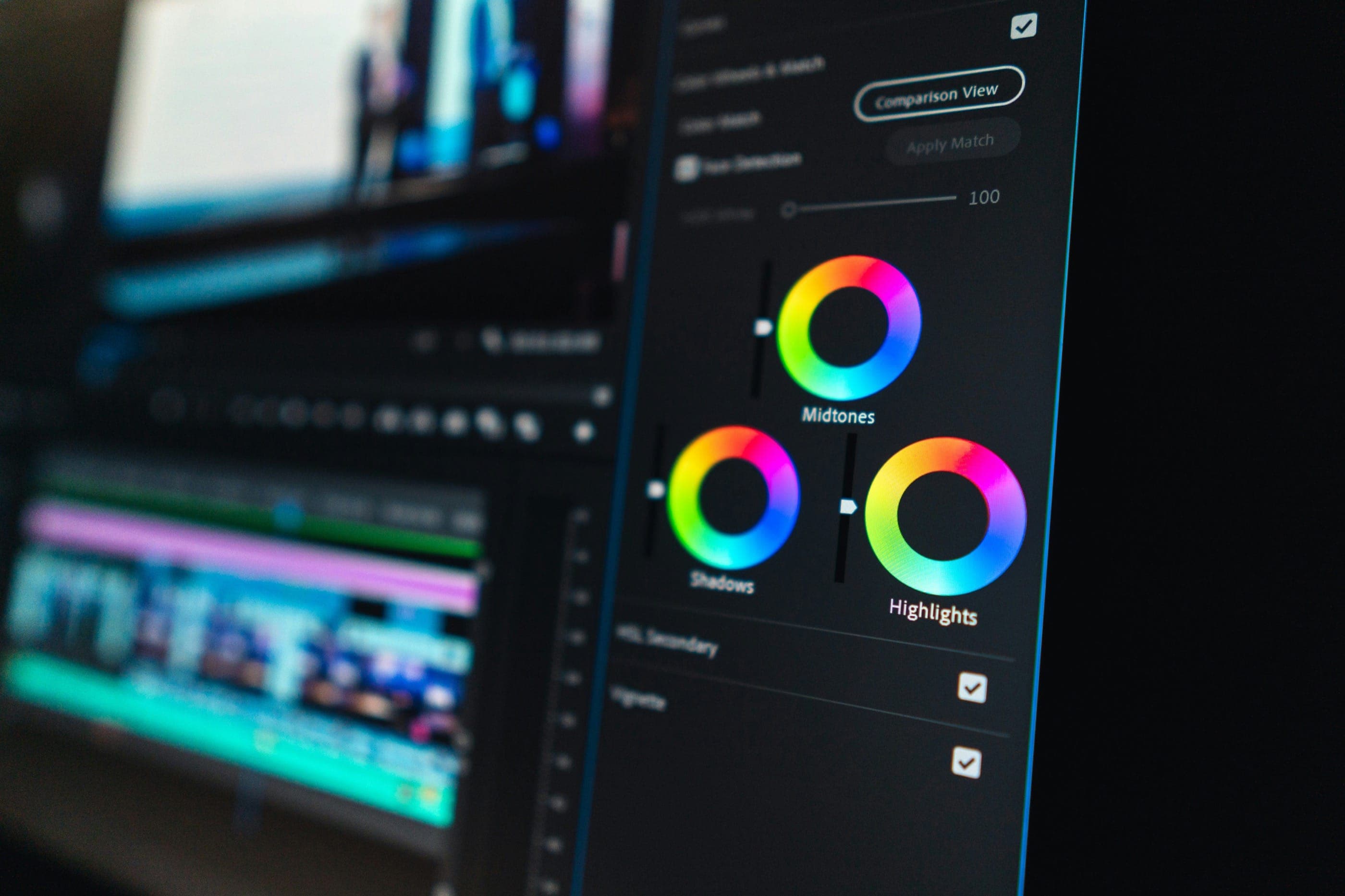
Primary grading tools include lift, gamma, and gain wheels; log controls; HDR/SDR primary controls in Resolve; and curve adjustments. The goal is to make every shot in a scene read as if it were shot under identical conditions -- even when the production spent multiple days shooting different setups under changing light.
Secondary Color Grading and Look Development
Secondary grading is where the creative look is built. Using qualifiers, masks, and tracking tools, the colorist can isolate specific elements of the frame and treat them independently:
- Skin tone isolation to protect actor complexions while applying aggressive looks to backgrounds
- Sky replacement preparation or sky grading to separate foreground and sky treatment
- Object tracking to follow a specific element through a moving shot and apply a targeted adjustment
- Window power grades to darken the edges of a frame and draw the eye to the center
- Selective desaturation to create a specific visual effect on non-skin hues
Secondary grading is the most artistically demanding part of the colorist's work. It requires a strong understanding of color theory, film aesthetics, and what directors and audiences respond to emotionally.
Client Sessions and Director Reviews
Most color work happens in collaborative client sessions. The director and DP sit in the suite with the colorist as grades are built or reviewed. These sessions require the colorist to communicate clearly about technical decisions in a language that is accessible to creative collaborators who may not know what a "qualifier" or "curves node" is. The ability to translate between technical and creative vocabulary is a key professional skill.
Client sessions follow a typical structure: a full review pass where the director responds to scenes, followed by targeted correction passes where specific notes are addressed. On longer features, multiple client sessions are typical -- one for rough look establishment, subsequent sessions for refinement, and a final sign-off session before delivery.
HDR and Streaming Platform Deliverables
Modern productions typically require multiple deliveries. A streaming platform like Netflix, Apple TV+, or Disney+ may specify:
- HDR10 or Dolby Vision HDR master at 4K resolution
- SDR (Rec.709) version derived from the HDR master
- Specific maximum light level (MaxCLL) and frame average light level (MaxFALL) targets
- Color gamut specifications (P3-D65 for HDR, Rec.709 for SDR)
- Delivery codec and container format (DPX, ProRes 4444 XQ, JPEG 2000)
The colorist is responsible for ensuring all deliverables meet these technical specifications exactly. Major streaming platforms have published technical delivery specifications that must be followed precisely -- errors in delivery can result in rejected masters and expensive reprocessing. For productions tracking post-production costs and delivery timelines, tools like Saturation's film editor and colorist schedules help coordinate post departments efficiently.
Archival Master and Finishing
After delivery, the colorist creates the archival color master -- the highest-quality version of the grade from which all future deliveries can be made. This master is stored with the production's archive alongside the camera originals and is the basis for any future re-releases, remastering, or format conversions the production may require years later.
Skills Required
Core Skills for Film Colorists
Film colorist work demands a combination of deep technical knowledge and refined visual sensitivity. The skills required span color science, software expertise, hardware operation, client communication, and delivery compliance -- all applied simultaneously under production pressure.
DaVinci Resolve
DaVinci Resolve is the industry standard for professional film and television color grading. The vast majority of professional colorist positions require deep Resolve proficiency, and it is the primary application taught in colorist training programs worldwide. Key areas of Resolve competency include:
- Node-based grading workflow (serial, parallel, and layer nodes)
- Primary Wheels, Log controls, and Curves for exposure and color balance
- Qualifier tools for secondary isolation (HSL qualifier, luminance qualifier, 3D qualifier)
- Power Windows and tracking for masked corrections on moving subjects
- Color Warper and Hue vs Hue, Hue vs Sat curves for targeted hue manipulation
- HDR Palette controls for Dolby Vision and HDR10 grading
- Gallery and stills management for storing and applying grades across shots
- Shared nodes and Remote Grades for applying consistent looks across multiple shots
- Fusion integration for compositing within the color pipeline
- Delivery page configuration for rendering multiple format specifications
Baselight
Baselight (developed by FilmLight) is the other primary professional color grading system used at high-end post-production facilities and on major feature films. While Resolve dominates the mid-range and independent market, many major facilities run Baselight for their highest-budget work. Colorists who can operate both systems have a broader range of facility options available to them. Baselight uses a layer-based (rather than node-based) grading paradigm that requires a distinct workflow approach.
Color Science and Log Formats
Understanding color science is foundational to professional grading. Working colorists must know:
- ARRI LogC3 and LogC4: ARRI camera log formats used on ALEXA Mini LF, ALEXA 35, and related cameras. Industry-standard for high-budget narrative production.
- Sony S-Log2 and S-Log3: Sony cinema camera log formats (FX3, FX6, FX9, VENICE series). S-Log3 is the most common professional Sony format.
- RED Log3G10 and RedWideGamutRGB: RED camera log format used with R3D raw files.
- Canon Log 2 and Canon Log 3: Canon Cinema EOS log formats (C70, C300 Mark III, C500 Mark II).
- Blackmagic Film / Blackmagic Design Film Gen 5: Blackmagic camera log formats (BMPCC 4K, 6K, Pyxis, URSA series).
- ACES (Academy Color Encoding System): A color management standard used on major productions to create a camera-agnostic input transform pipeline. Understanding ACES Input Device Transforms (IDTs) and Output Device Transforms (ODTs) is required for facility work on ACES-based productions.
- Color Gamut: Understanding the relationship between camera native gamuts (AWG, SGamut3.Cine, REDWideGamutRGB) and delivery color spaces (Rec.709, P3-D65, Rec.2020) is essential for correct color space management.
HDR and SDR Grading
High dynamic range (HDR) delivery is now standard for streaming platform content. Colorists working in this space must understand:
- Dolby Vision and HDR10 mastering requirements and the difference between the two formats
- MaxCLL (Maximum Content Light Level) and MaxFALL (Maximum Frame Average Light Level) specifications and how to measure them
- HDR-to-SDR trim pass workflow -- creating an SDR version that reads correctly on standard displays while preserving the HDR master's integrity
- Reference monitor calibration for HDR grading (ST.2084 PQ EOTF, P3-D65 color space)
- Nit (candela per square meter) targets for different HDR formats (1,000 nit vs 4,000 nit peak white)
Reference Monitor Calibration
Professional color grading requires a calibrated reference monitor -- typically a Sony BVM (Broadcast Video Monitor) or Flanders Scientific (FSI) monitor for high-end work. Colorists must understand:
- How to use a colorimeter or spectrophotometer to verify monitor calibration against target specifications
- The difference between a reference monitor (calibrated to a precise standard) and a creative display
- Viewing conditions for color evaluation (D65 ambient, controlled lighting levels)
- How to interpret a waveform monitor, vectorscope, and parade scope for objective color measurement
Streaming Platform Delivery Specifications
Colorists delivering to major streaming platforms must know each platform's specific technical requirements:
- Netflix: Publishes detailed Image and Sound Delivery Specifications (ISDS). Requires Dolby Vision or HDR10 for 4K originals, specific MaxCLL limits, ProRes 4444 XQ or JPEG 2000 MXF for masters.
- Apple TV+: Requires Dolby Vision HDR with specific mastering targets. Apple has its own submission portal and delivery specifications distinct from Netflix.
- Disney+ / Hulu: Publishes their own technical specifications through their content delivery portal.
- Amazon Prime Video: Accepts HDR10 and Dolby Vision; specific codec and file format requirements vary by content type.
Client Communication and Session Management
The colorist's creative skills are irrelevant if they cannot communicate effectively with directors, DPs, and executive producers during client sessions. Key interpersonal skills include:
- Translating creative language ("I want it to feel colder, more isolated") into technical adjustments the colorist can execute in the software
- Managing client expectations around what is achievable in color versus what requires a reshoot or VFX work
- Pacing a session efficiently so the director feels heard and productive without losing hours to indecision
- Providing alternatives when a requested adjustment does not work as the director imagined, so the session moves forward rather than stalling
Conform and Editorial Pipeline Knowledge
Understanding how the edit and color systems connect is essential for troubleshooting conform issues and communicating with editors. Colorists should be familiar with:
- EDL (Edit Decision List) and XML exchange formats from Avid, Premiere Pro, and Final Cut Pro
- Offline vs online editing workflow and where color fits in the post timeline
- How VFX handoffs work -- receiving plates from VFX for integration into the grade
- Proxy vs camera original file management
Productions that manage their post-production pipeline with integrated tools -- tracking VFX deliveries, color session scheduling, and delivery milestones alongside budget -- run more efficiently through post. Saturation's platform helps productions track the director of photography's deliverables and post-production timelines in one place.
Visual Storytelling and Film Aesthetics
Technical skill alone does not make an excellent colorist. The best colorists have developed a strong visual sensibility through studying film history, photography, painting, and the work of influential cinematographers. Understanding why the teal-and-orange look became dominant in action cinema, what the desaturated look of a prestige drama communicates emotionally, or how cold blue shadows can create psychological unease requires cultural and aesthetic knowledge that no software tutorial provides. The most in-demand colorists are those whose technical skills are matched by an equally developed artistic intelligence.
Salary Guide
Film Colorist Salary Overview
Film colorist compensation varies substantially based on experience level, market, production type, and whether the colorist is facility-based or freelance. The role is generally well-compensated relative to other post-production positions, reflecting the specialized technical and artistic expertise required.
According to ZipRecruiter salary data, the average annual salary for a video colorist in the United States is approximately $52,000-$68,000, with the middle 50% earning between $37,700 and $70,000 annually. Entry-level colorists in smaller markets earn significantly less, while experienced senior colorists at major post-production facilities in Los Angeles and New York can earn substantially more -- particularly when total compensation includes benefits, health coverage, and profit participation at facility level.
Day rate data from Backstage and industry sources indicates that freelance colorists charge between $700 and $1,000 per day for standard commercial and independent production work, with experienced senior colorists on major studio projects charging $1,500-$3,000+ per day depending on project scale and market.
Colorist Day Rates by Experience and Production Type
Day rates are the most relevant compensation benchmark for freelance colorists, who make up the majority of the field:
- Entry-level / junior (0-2 years): $100-$300/day for student films, short films, and ultra-low-budget indie projects. Many early-career colorists work at reduced rates or on deferred payment to build their reel.
- Mid-level (3-6 years): $400-$800/day for independent features, commercial work, and branded content. Colorists at this stage have a portfolio and client relationships but are not yet on major studio projects.
- Senior colorist (7+ years): $800-$1,500/day for studio-adjacent independent features, streaming originals at the mid-budget tier, and established commercial relationships.
- Top-tier feature and streaming (10+ years, major credits): $1,500-$3,500+/day. Senior colorists at leading post facilities (Company 3, Technicolor, Goldcrest, Harbor Picture Company) working on major studio and premium streaming productions. These rates reflect not just the grading work but the colorist's reputation, their client relationships, and the facility's overhead included in their day rate.
Facility-Based vs Freelance Colorists
Colorists work in two primary employment structures, each with distinct compensation dynamics:
Facility-Based Colorist
A facility-based colorist is employed by a post-production house (DI facility, finishing studio, or broadcast post facility) on a salary or retainer basis. The facility brings in clients and projects; the colorist grades them using the facility's equipment, software, and infrastructure. Facility employment provides:
- Consistent income (salary or day rate retainer), not dependent on finding each project independently
- Access to high-end equipment (Baselight, Sony BVM monitors, professional control surfaces like the Resolve Micro/Mini/Advanced panels)
- Benefits (health insurance, paid time off) at established facilities
- A built-in client base, since the facility's reputation generates work
- Mentorship from senior colorists at the same facility
Salary ranges for facility colorists in major markets (Los Angeles, New York) typically run $60,000-$120,000+ annually depending on experience and facility prestige. Junior colorists and color assistants at facilities start lower -- often $40,000-$55,000 -- with significant upside as they advance.
Freelance Colorist
A freelance colorist runs their own business, bringing their own equipment (or renting suite time) and finding clients independently. Freelancers set their own rates and choose their projects, but must cover their own:
- Equipment costs (DaVinci Resolve Studio license: $295 one-time; professional control surface: $3,000-$30,000; reference monitor: $5,000-$30,000+)
- Health insurance and retirement savings
- Business development and marketing costs
- Suite rental when not working from a home setup
Experienced freelance colorists with strong client networks and a full calendar can earn $100,000-$200,000+ annually in major markets. The ceiling is higher than facility employment, but the floor is also lower -- quiet periods between projects directly affect income.
Salary by Experience Level
Entry Level (0-2 Years)
Early-career colorists typically work as color assistants or junior colorists at facilities, or take on low-budget independent projects to build their reel. Annual income at this stage ranges from $30,000-$50,000 in most markets. The focus is on building technical skills and professional relationships rather than maximizing income. Color assistants at major facilities learn conforming, QC, and delivery workflow alongside their grading development.
Mid-Career (3-7 Years)
A colorist with a solid portfolio and established client relationships -- working consistently on independent features, commercials, and branded content -- can earn $55,000-$90,000 annually. Day rates in this range typically fall between $500-$1,000/day. At this stage, colorists often have a specialty: they may be known for a particular aesthetic, a specific camera system, or a specific genre (documentary, commercial, narrative).
Senior / Experienced (8+ Years)
Established colorists with major credits -- studio features, premium streaming series, or high-profile commercial campaigns -- command the highest compensation. Senior colorists at major LA and NY facilities can earn $100,000-$180,000+ annually in total compensation. Freelance senior colorists working on major productions earn equivalent or more, though with higher income variability.
Salary by Market
Geographic market significantly affects colorist compensation:
- Los Angeles: The largest concentration of post-production facilities and studio work. Home to major facilities including Company 3, Technicolor, Goldcrest, and Harbor. Market rates are the highest in the country for equivalent experience levels, and competition for senior positions is also highest.
- New York City: Strong market for commercial work, broadcast, and independent features. Many advertising agency and brand content colorists are based in New York. Rates comparable to LA for equivalent work.
- Atlanta, Georgia: The third-largest production hub in the US. Growing local post-production infrastructure following the expansion of studio production in Georgia. Rates typically 15-25% below LA/NY for equivalent budget levels.
- Chicago, Dallas, Seattle, Miami: Regional production markets with established post facilities and commercial markets. Lower rates than coastal majors, but also lower cost of living and less competition for experienced colorists.
- London: Major international hub for colorist work, particularly on major studio features and streaming productions. Major facilities including Technicolor London, Harbor Picture Company, Goldcrest, and Envy Post serve the UK and European streaming market. Compensation in GBP at competitive rates.
Streaming vs Feature Film vs Commercial
Production type affects both rates and working conditions:
- Studio features: High day rates, extended projects (weeks to months in the suite), significant prestige, and often the most complex technical requirements (multi-version HDR/SDR deliveries, theatrical DCP mastering). The most competitive space to break into.
- Premium streaming (Netflix, Apple TV+, HBO/Max, Disney+): Rates competitive with studio features. Extended project engagement. Demanding technical delivery specifications. Increasingly the primary route for colorists who previously built careers in theatrical features.
- Commercial and branded content: Short projects (one to five days), high day rates relative to runtime, stylistic variety, and steady workflow throughout the production year. Many experienced colorists build sustainable businesses around commercial work, supplemented by select narrative projects.
- Documentary: Typically lower rates than narrative features. Faster turnarounds. Good portfolio value but less financially rewarding than commercial or streaming work.
- Music videos: Very short projects, often low pay, but high stylistic freedom. Useful for early portfolio development. Not a primary income source for experienced colorists.
Career Income Reality
The vast majority of professional colorists are freelance contractors. Their effective annual income depends not only on their day rate but on how many days per year they work. Experienced colorists in strong markets who maintain busy calendars -- 180-220 days per year on paid projects -- earn substantially more than their day rate alone suggests. Newer colorists often work fewer billable days while building their client base, and must factor quiet periods into their income expectations.
Productions that manage their post-production budgets carefully -- tracking colorist fees, suite rental costs, and delivery expenses -- use integrated financial platforms to control these line items. Understanding the full post-production cost picture is part of what line producers and production accountants do when structuring realistic delivery budgets.
Frequently Asked Questions
Frequently Asked Questions
What does a film colorist do?
A film colorist controls the color, contrast, and tone of every frame in a film, television series, or commercial during post-production. Their work divides into two phases: primary color grading (correcting exposure, white balance, and shot-to-shot consistency) and secondary color grading (building the creative visual look, isolating specific elements of the frame, and creating the distinctive aesthetic the director and DP intended). Colorists work in close collaboration with the director and cinematographer during client sessions, and deliver the final graded master to broadcast, streaming, or theatrical specifications.
How much does a film colorist earn?
Freelance colorists typically charge $700-$1,000 per day for commercial and independent production work, rising to $1,500-$3,500+ per day for senior colorists on major studio and streaming productions. Annual earnings for facility-based colorists range from $40,000-$55,000 for junior colorists to $100,000-$180,000+ for senior colorists at major LA and NY facilities. Freelance senior colorists with strong client networks can earn $100,000-$200,000+ annually when working consistently. Entry-level colorists building their reel often earn $30,000-$50,000 in the early years.
Do you need DaVinci Resolve to be a film colorist?
DaVinci Resolve is the industry-standard color grading application and is effectively required for professional colorist work. The vast majority of post-production facilities, independent productions, and commercial clients use Resolve. The free version of Resolve is fully capable for professional color work; the Studio version ($295 one-time) adds additional features including noise reduction, advanced ResolveFX, and collaboration tools. Familiarity with Baselight is valued at high-end facilities, and some commercial work uses Adobe Premiere's Lumetri color or Final Cut Pro -- but Resolve proficiency is the primary technical requirement.
How do you become a film colorist?
The most common career pathways into professional colorist work are: (1) starting as a digital imaging technician (DIT) on-set, where you manage camera media and apply show LUTs, then transitioning into the color suite; (2) starting as a color assistant or conforming artist at a post-production facility and learning the pipeline while assisting senior colorists; (3) self-training via Blackmagic Design's free Resolve training materials, grading short films and music videos to build a portfolio, and gradually attracting paying clients. Formal education in film production or cinematography is useful but not required. The most important single investment is mastering DaVinci Resolve and building a strong showreel.
What is the difference between a colorist and a DIT?
A DIT (digital imaging technician) works on-set during production, managing camera media, creating and organizing dailies, applying the show LUT to on-set monitors so the director and DP can see a preview of the intended look, and ensuring camera data is properly backed up and organized. A colorist works in post-production after principal photography is complete, doing the full creative grade in a controlled suite environment. The roles are related -- many colorists began as DITs -- but they are distinct positions in the production pipeline. On smaller productions, the same person may do both roles.
What is HDR and why does it matter for colorists?
HDR (High Dynamic Range) is a display format that allows for significantly brighter highlights, deeper shadows, and a wider color gamut than standard SDR (Standard Dynamic Range) displays. For colorists, HDR means grading to a higher luminance target (typically 1,000 nits peak white for HDR10, or 4,000 nits for Dolby Vision) and delivering both an HDR master and an SDR version derived from it. Major streaming platforms including Netflix, Apple TV+, Disney+, and Amazon Prime Video require HDR deliverables for 4K original content. Colorists who cannot work in HDR are excluded from a growing portion of the premium content market.
Is it better to be a freelance colorist or work at a facility?
Both paths have advantages. Facility employment provides stable income, access to high-end equipment, mentorship from senior colorists, and a built-in client base -- making it significantly better for early career development. Freelancing offers higher income potential for experienced colorists with strong networks, creative freedom in selecting projects, and the flexibility of running an independent business. Most colorists who build successful freelance practices first spent years at a facility developing their skills and client relationships. The facility-to-freelance trajectory is more common than starting freelance immediately.
Do film colorists need a formal education?
A formal degree is not required to become a working film colorist. The field is portfolio-driven: your showreel, your client relationships, and your technical proficiency matter far more than academic credentials. That said, film production or cinematography degrees provide useful theoretical grounding in visual storytelling, color theory, and post-production workflow. The most important educational investment for any aspiring colorist is the Blackmagic Design DaVinci Resolve certification program, which provides structured training on the industry-standard application. Free Resolve training materials from Blackmagic lower the barrier to self-study significantly.
Education
Do You Need a Degree to Become a Film Colorist?
No formal degree is required to work as a film colorist. The field is highly portfolio-driven: what you have graded, how it looks, and which productions you have worked on matters far more than academic credentials. That said, formal education in film production, cinematography, or digital media provides useful theoretical grounding that accelerates skill development for many colorists.
The most important educational investment for any aspiring colorist is achieving deep proficiency in DaVinci Resolve -- the industry-standard color grading application that runs the vast majority of professional color suites worldwide.
Film and Media Production Degree Programs
University programs that cover cinematography, post-production, and color science provide the strongest academic foundation for colorist work. Relevant degree types include:
- BFA or BA in Film Production: Covers the full production pipeline, including post-production workflows, editing, and color. The most direct academic path for someone aiming at a crew career in post-production.
- BA or BS in Cinematography / Digital Filmmaking: Focuses heavily on camera, lighting, and image acquisition -- knowledge that is directly useful when understanding what a DP intended when they shot log footage under a particular lighting setup.
- BFA in Digital Media or Media Arts: Covers color theory, digital imaging, and visual aesthetics alongside production skills. Particularly useful for colorists working across broadcast, streaming, and commercial markets.
- BS in Film Technology or Post-Production: Technical programs at institutions like Full Sail University or Brooks Institute that combine technical coursework with hands-on production work.
Film schools with strong post-production programs and industry placement records include the American Film Institute (AFI), USC School of Cinematic Arts, NYU Tisch School of the Arts, UCLA School of Theater Film and Television, Emerson College, and Chapman University Dodge College. Community college digital media programs offer a more affordable pathway with strong technical coursework for self-funded students.
Blackmagic Design DaVinci Resolve Certification
The most important professional credential for working colorists is the Blackmagic Design DaVinci Resolve certification program. Blackmagic offers structured training and official certification at two levels:
- DaVinci Resolve Certified User: Entry-level certification covering the core tools of the application -- timeline navigation, node-based grading, primary and secondary corrections, and basic delivery.
- DaVinci Resolve Certified Trainer: Advanced certification for instructors who teach the application, requiring demonstrated expertise across color, audio (Fairlight), and editing (Cut/Edit pages).
Blackmagic provides free official training materials -- including the full DaVinci Resolve manuals and training workbooks -- at no cost. The application itself has a free version that is fully professional-grade for color work, meaning the barrier to self-study is extremely low. Formal certification demonstrates verified competency to facility managers and supervising colorists who are evaluating candidates for assistant or junior colorist positions.
Colorist-Specific Training Programs
Several professional training programs are dedicated specifically to colorist development:
- Mixing Light: One of the most respected online resources for professional colorists. Offers in-depth video courses on Resolve and Baselight, color science, HDR grading, and client workflow. Produced by working senior colorists. Subscription-based with a large library of advanced content.
- International Colorist Academy (ICA): Offers hands-on, instructor-led colorist training workshops in major cities. Covers DaVinci Resolve, color science, and professional workflow. Used by both aspiring colorists and experienced practitioners upgrading their skills.
- Cullen Kelly (CullenKelly.com): YouTube channel and online courses from a working Hollywood colorist. Widely used for learning Resolve, color science, and HDR workflow at a professional level.
- FxPhD: Advanced online courses in color science, grading, and VFX color pipeline -- aimed at professionals rather than beginners.
- LinkedIn Learning / Udemy: General DaVinci Resolve courses ranging from beginner to intermediate. Useful for initial orientation but less rigorous than dedicated colorist training programs.
The DIT and Assistant Colorist Pathway
The most common entry route into professional colorist work is through the DIT (digital imaging technician) role on set or the assistant colorist role in a post-production facility.
As a DIT, you manage camera media on-set, process dailies, and apply the show LUT designed by the colorist -- gaining hands-on experience with log formats, color pipelines, and the practical realities of production image management. Many working colorists began as DITs and moved into the suite as their grading skills developed.
As an assistant colorist (sometimes called a "color assistant" or "online assistant") at a post facility, you handle conform work, QC, and delivery tasks -- working alongside the senior colorist on live projects and learning the facility's pipeline from the inside. This is the fastest way to reach a working professional environment and develop the specific skills senior colorists look for when hiring.
The Color Society
The Color Society is a professional association for colorists worldwide. Membership provides access to networking events, educational resources, and a community of working colorists. It is not a union and does not set rates, but it is a valuable peer network for colorists at all career stages and a useful signal of professional engagement on a resume or portfolio.
Building a Portfolio
Regardless of education path, a showreel is the primary currency in the colorist job market. Aspiring colorists build their reel by:
- Grading student films and short films for emerging directors (often for low or no pay)
- Re-grading existing film clips as personal projects to demonstrate style and technical range
- Creating before/after comparison reels that show the raw log image alongside the finished grade
- Working on music videos and branded content, which often have shorter timelines and more stylistic freedom than narrative features
A strong showreel communicates that you understand color as a narrative tool -- not just that you know how to operate software. Directors of photography and directors who are evaluating colorists look for evidence of intentional creative decision-making, not technical competence alone.
Last updated April 25, 2026
Budget this role in seconds with Saturation
Rate packs, fringes, and phases turn a crew list into an accurate production budget without the spreadsheet math.
Rate packs
Verified union rates, versioned.


Fringes and markupsRebuilt
Stack them, cap them, and see the split on every line.
PhasesRebuilt
Every column knows its type.
Auto-fill
Rates fill in as you type, from the source you turned on.